
Blog · March 30, 2026
Why old photos turn yellow
Prints yellow, negatives shift orange, slides go magenta. The chemistry of aging photos in plain language.
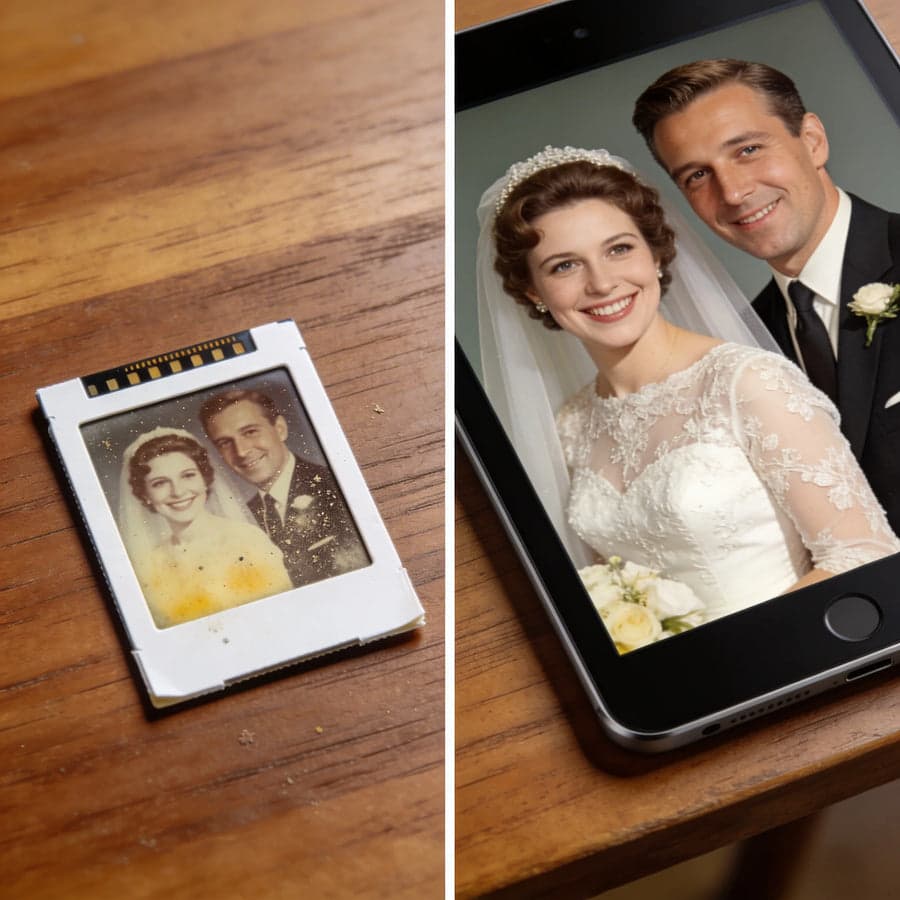
Open any album from the 1970s and the photos have turned warm: yellows, oranges, faded faces. Different things are happening depending on what is yellowing.
Prints
Photographic paper yellows for two reasons. The paper base itself contains residual processing chemicals that keep reacting for decades, and the cyan dye layer fades fastest in light, tipping the balance toward yellow and red. Prints displayed on walls age years faster than the same prints in closed albums.
Album pages made things worse: the sticky magnetic albums of the 1970s used adhesives and PVC covers that actively attack photos. If your prints are in those, the negatives are almost certainly in better shape than the prints.
Negatives
Color negatives start orange by design, the printing mask, but aging adds a shift on top as the dye layers decay unevenly. The scan correction that removes the mask also compensates most of the age shift.
Slides
Slide films other than Kodachrome tend to drift magenta or red in storage as the cyan layer gives out. The image survives underneath; it needs rebalancing, not rescue.
The good news
Yellowing is mostly imbalance, and imbalance is correctable. Scanners with automatic color correction rebalance the layers at capture, which is why a scan of a yellowed original so often looks decades younger than the object in your hand. The earlier you scan, the more there is left to rebalance.
Ready to scan your own archive
The MemoryVault Box digitizes 35mm negatives and slides in 3 seconds per photo, no computer needed, with a 90-day money back guarantee.
Get the Box, from $149.99